What Good AI Assignment Design Looks Like, and Why We Built Teach the AI First
Share this Article

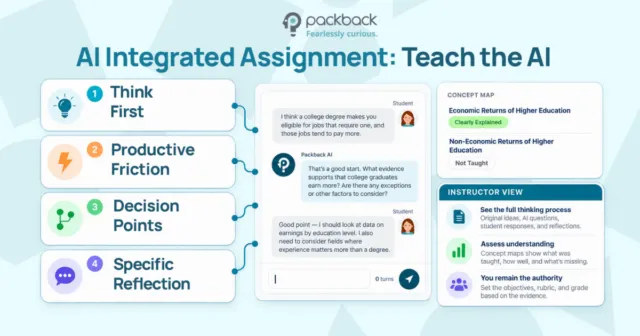
The first AI Integrated Assignment is here. Students teach. The AI learns. You see the whole conversation.
The conversations faculty are having with me these days have nothing to do with banning AI or detecting its use. Instead, they have been asking me something harder: “How do I know a student actually thought about this, and how can I see that thinking?”
Of course, detection software does not answer that question. But it does answer a different one (badly!) and it puts instructors in an adversarial posture with their own students. So we stopped designing around the question of whether AI was used and started designing around a better one: how did this student think while using it?
That reframe produced a set of design principles, and those principles produced our first assignment type.
Teach the AI is live now for every instructor with an existing Packback license, at no additional charge.
What is an AI-integrated assignment?
An AI integrated assignment is a coursework activity where students work with AI inside a structured flow that captures their reasoning, so instructors see the thinking behind the submission rather than only the finished artifact. The AI is not a tutor handing out answers and not a tool to be “caught.” It is used intentionally and material the student has to do something with as part of the assignment.
The distinction matters because the risk to AI use in higher education is when it’s invisible with no structure, no decision points, and no record of judgment.
Which design principles shape AI assignment design at Packback?
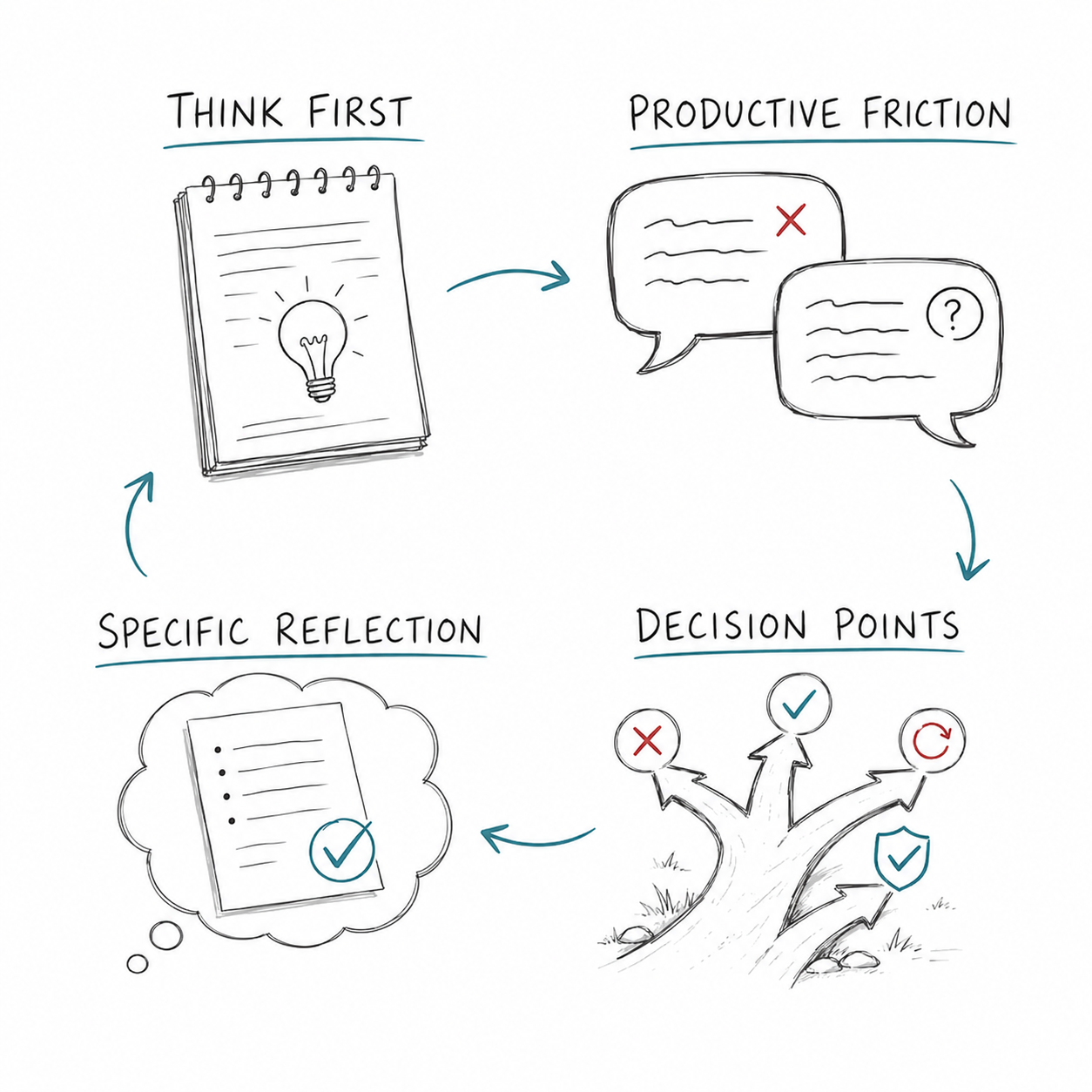
Four principles govern every assignment type we build. Each one exists because a common classroom failure mode exists. Students think before AI generates. A student facing a hard prompt will paste it into a chatbot before forming any position of their own. We interrupt that by requiring an intellectual move first: an outline, a stated claim, a prediction, a set of examples. The point is not busywork. It gives the student a baseline of their own to defend, and it gives you a before-and-after view of their reasoning.
AI creates friction, not shortcuts.
If the system completes the task, the student loses the productive struggle that builds expertise. So we design AI behavior that is incomplete, contestable, or occasionally wrong on purpose. The goal is not to make the work easier. The goal is to make the right thinking harder to avoid.
Every assignment contains visible decision points.
Accepting a suggestion, rejecting a claim, correcting a misunderstanding, choosing one piece of evidence over another. These moments show intellectual participation in a way that time-on-task data never will, and they are far more useful to you as an instructor than a similarity score.
Reflection is specific, not performative.
“I learned a lot about this topic” tells you nothing. Reflection tied to a concrete artifact from the assignment, a claim the student changed or a moment the AI got something wrong, tells you quite a bit. We anchor every reflection prompt to something that actually happened in the student’s own work.
Underneath all four sits one commitment: you, the instructor, remain the pedagogical authority. You set the objectives, the source material, and the rubric. The AI operates inside your boundaries, and you assign the grade.
AI Integrated Assignments gives students a structured place to learn how to use AI in a way that builds AI literacy, while giving instructors a visible, gradable record of the thinking behind every submission.
Learn More about AI Integrated Assignments ›
Why did Teach the AI launch first?
We launched Teach the AI first because teaching is the hardest thing to fake. A student can prompt their way to a competent paragraph easily enough. But explaining a concept to a confused learner, catching the moment that learner misstates it, and correcting the error in real time requires understanding that no prompt supplies.
“If you can’t explain it simply, you don’t understand it well enough”
The protégé effect is well established in learning science. Students who prepare to teach material learn it more deeply than students who prepare to be tested on it. We built an assignment around that finding and flipped the usual roles.
How does Teach the AI work?
Instead of asking AI for answers, the student is the teacher and the AI is the learner. In Teach the AI, students explain a course concept to an AI that acts like a curious novice. It asks questions, repeats ideas back incorrectly, and students have to catch the error and correct it. The conversation they produce becomes evidence of what they understand and where they are still shaky.
- Plan. The student sees the topic, the learning objectives, and your rubric up front. They write an outline and choose the examples they intend to use. Those notes lock when teaching begins, which preserves the think-first baseline.
- Teach. The student explains the concept across a 15-turn conversation, by typing or by voice. The AI plays a curious novice. It asks follow-up questions, repeats ideas back incorrectly, and waits to be corrected. It learns exactly what it is told, mistakes included, so the student has to notice the error and teach through it.
- Review. Before submitting, the student sees a concept map tagging each objective from “Not Taught” to “Clearly Explained,” with evidence quoted from their own conversation. They know where their explanation held and where it thinned out.
- Grade. You get the full transcript, the planning notes, the reflection, and the tagged concept map. Every tag carries reasoning and evidence in the student’s own words. Edit any tag you disagree with, score your rubric, and leave feedback. The system speeds the read. It does not set the grade.
Setup takes two to six learning objectives, your source material, and a rubric. Packback runs on LTI 1.3 in Canvas, Blackboard, and D2L Brightspace with SSO, so you can use your existing LMS. Build an activity once and assign it across sections and terms.
What instructors get back
Instructors get evidence of critical thinking and productive struggle against the assignment concept map that they can accept as-is or overrule. Legacy AI systems that hand down black-box judgments on student integrity demands blind trust. . .the exact opposite of effective pedagogy. You turn assessment into a true teaching tool when you can surface clear evidence and lay out student reasoning in a way that empowers you to evaluate, debate, and verify.
Teach the AI is the first of several assignment types with more rolling out through 2027. All are built on the same four principles with a different cognitive target. The through-line stays constant where students use AI without disappearing from their own learning, and you see enough of the process to teach into it.
If you’re already a Packback customer, Teach the AI is already live in your Packback account. Build an activity, assign it to one section, and read what comes back. If you’re not a Packback user, request a demo to see Teach the AI in action.
About the Author

Recent Articles
-
Webinar Recap: How to Design College Assignments to Promote Critical Thinking & AI Literacy
-
Meet the AI Panic With Pedagogy, Not Policing and Why AI Detection Won’t Fix Academic Integrity
-
A Student Told Me They Were Ethically Opposed to AI. Here’s What I Wrote Back.
-
Make Student Thinking Visible in an AI World (Webinar Recap)